The MikroTik hotspot app for iPhone and Android

Turn your MikroTik into a WiFi business

Create and print WiFi vouchers, see who's online, brand your hotspot login page and track every sale, all from your phone. No WinBox, no terminal, no networking degree.

Every feature free for 14 days RouterOS 6 and 7 No card to start

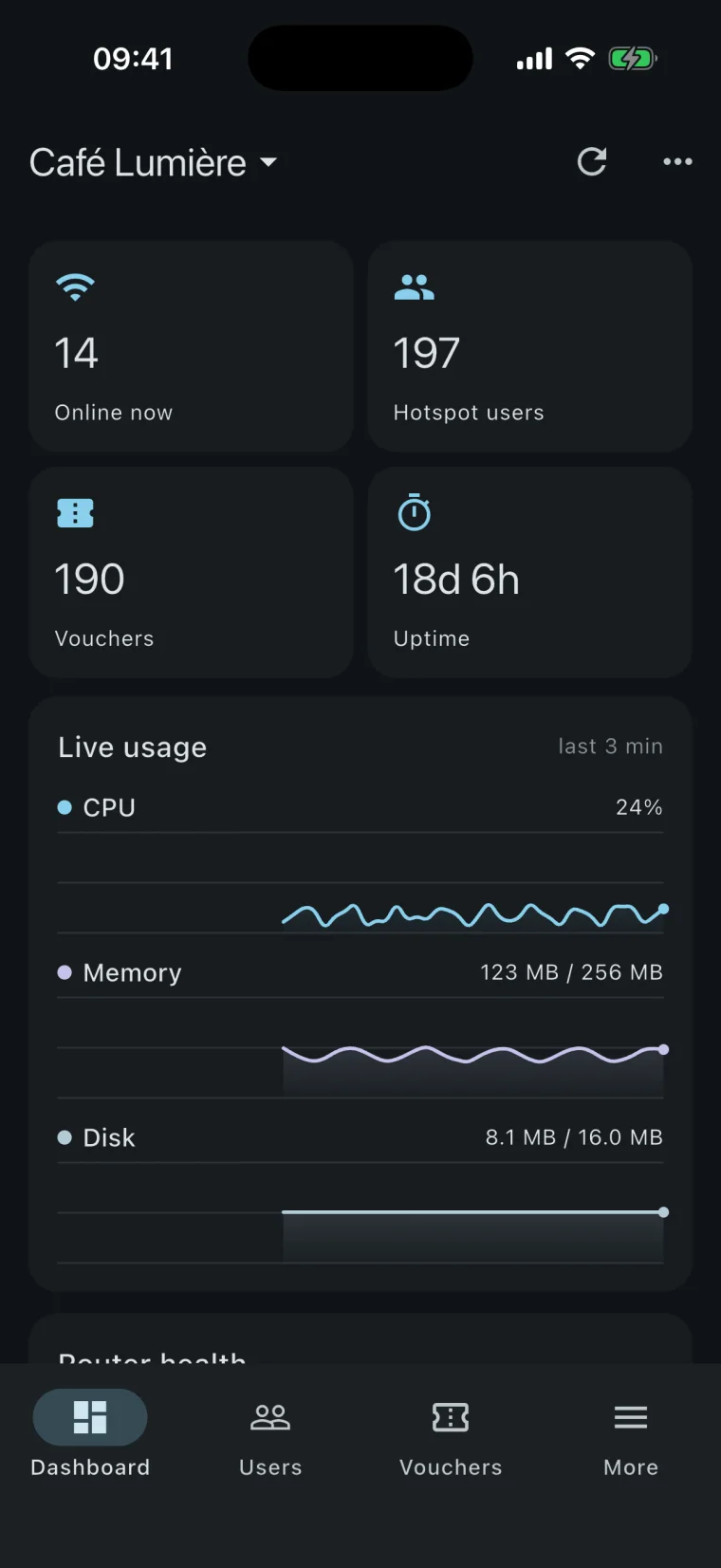
MikroWiFi dashboard for Café Lumière: 14 guests online, 197 hotspot users, 190 vouchers and live CPU and memory use
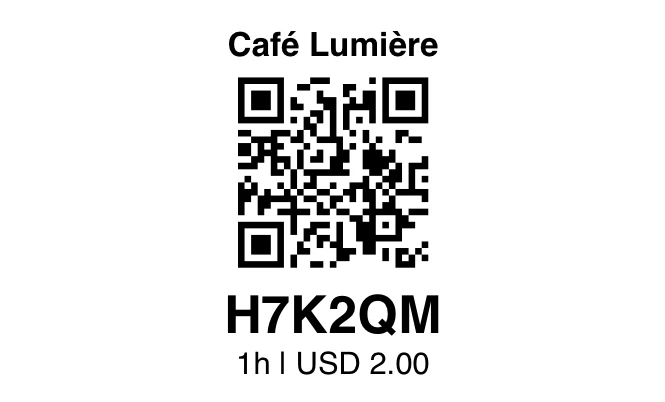
A printed WiFi voucher: Café Lumière, a QR code, code H7K2QM, 1 hour for USD 2.00
  • hAP, hEX, cAP, CCR and CHR
  • RouterOS 6.0 and newer
  • iPhone, iPad and Android
  • 12 languages
  • Passwords stay on your phone
How it works

From a new router to selling WiFi in one sitting

A guided setup walks you through every step and checks the router as you go.

  1. Connect your MikroTik

    Join the router's WiFi and tap scan: MikroWiFi finds it on the network. Sign in with the router's admin account, the same one you would use in WinBox.

  2. Turn on the hotspot

    Pick the port or WiFi your customers use and name the network. The wizard sets up the hotspot and its guest network, then you brand the login page.

  3. Sell and print vouchers

    Create a batch with a price, a time and a data limit, print it, and hand out codes. Guests scan the QR code and they're online.

Features

Everything a WiFi hotspot business needs

Made for cafés, hotels and small ISPs that want to sell internet access without learning RouterOS.

WiFi vouchers

Print vouchers that log guests in by themselves

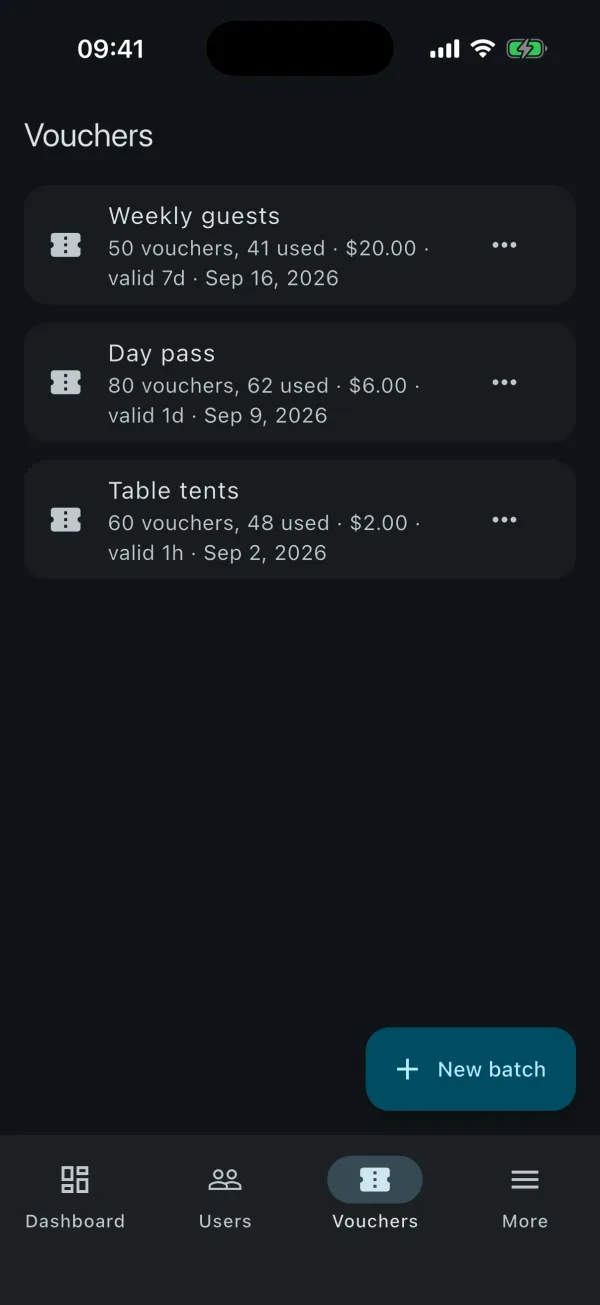
Make fifty codes in seconds, each with its own speed, time and data limit, and a price so every sale shows up in your reports.

  • A4 card sheets or 58 mm receipts, on any printer or a Bluetooth thermal printer
  • QR auto-login: guests scan the ticket instead of typing a code
  • Automatic clean-up deletes used vouchers on the schedule you choose
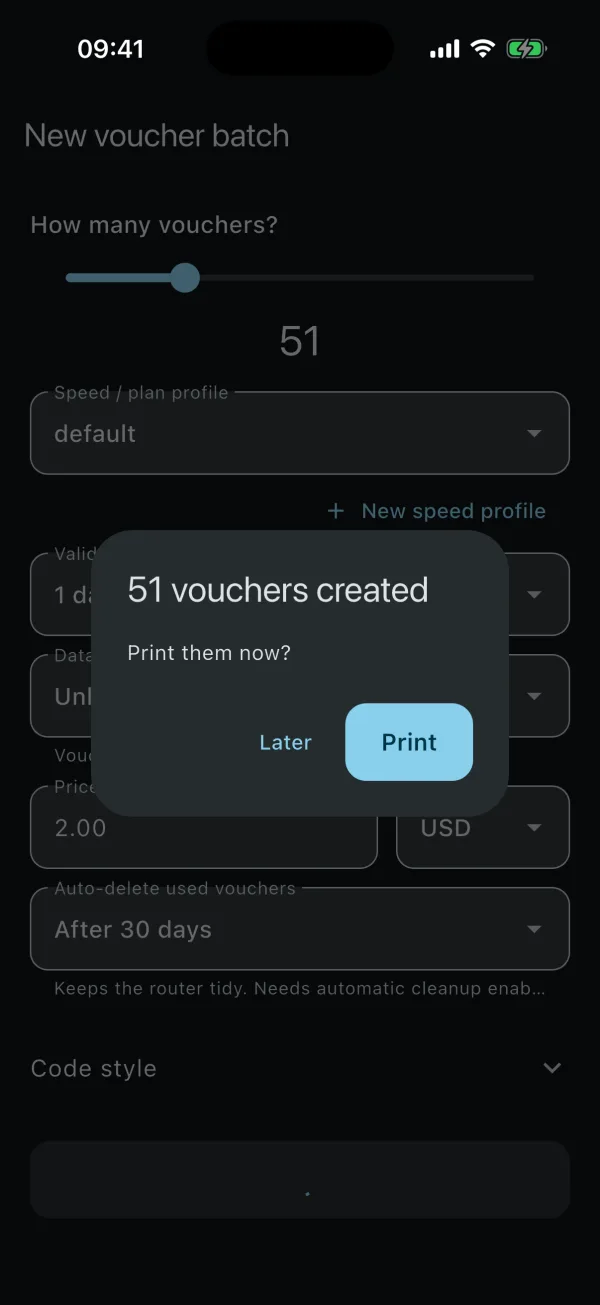
New voucher batch screen: 51 vouchers created, with a prompt to print them now
Printed voucher with a QR code that logs the guest in
Hotspot users

See who's online, and act in one tap

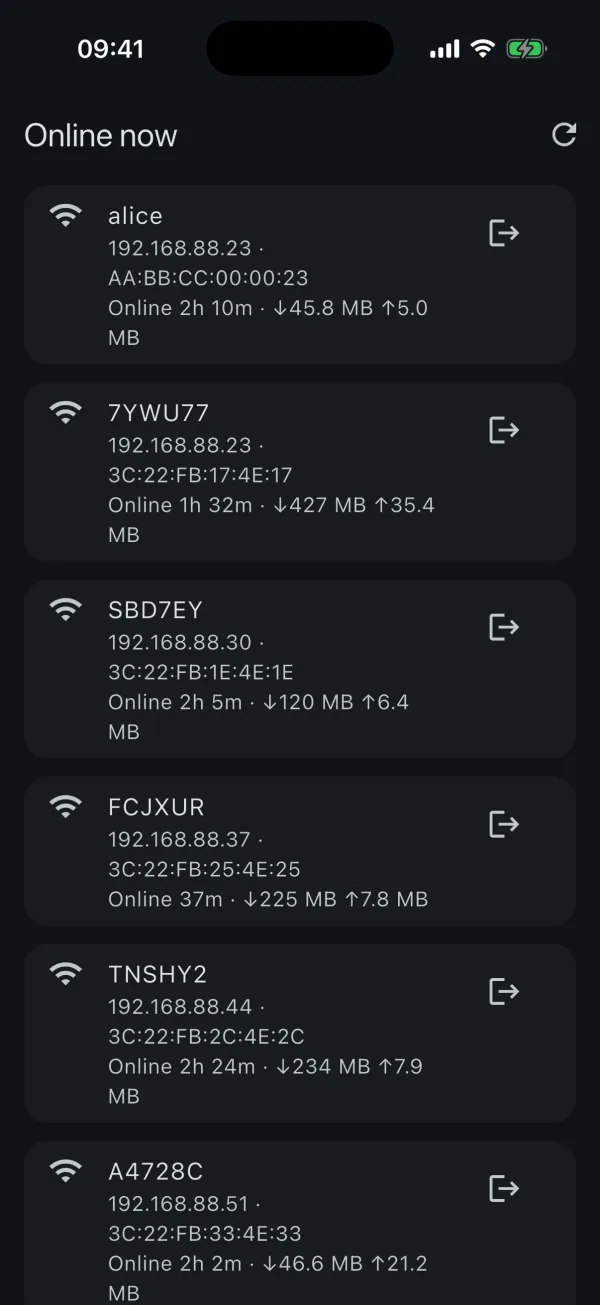
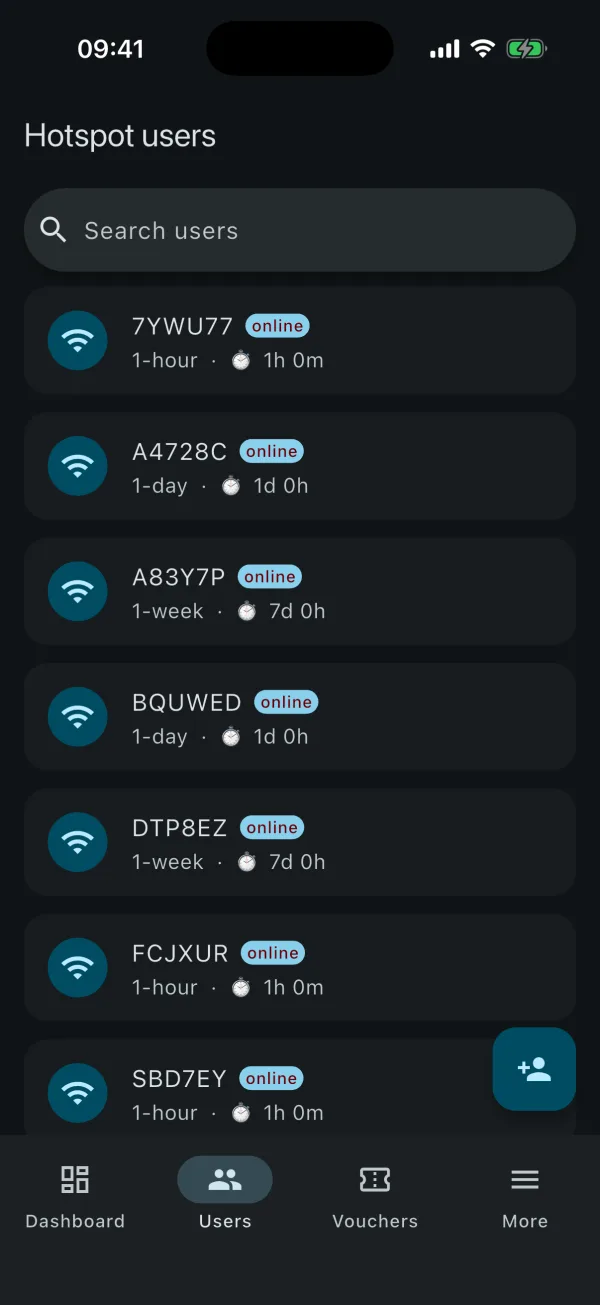
Every connected guest with their device, time online and data used. Disconnect anyone in one tap, or find a user by their voucher code.

  • Live sessions with download and upload per guest
  • Fair use and daily data: slow guests down after an allowance instead of cutting them off
  • Owner devices skip the login page, so you can always reach your router
Online now: guests with their IP address, MAC address, time online and data used
Hotspot users list with search
Captive portal

A login page with your name on it

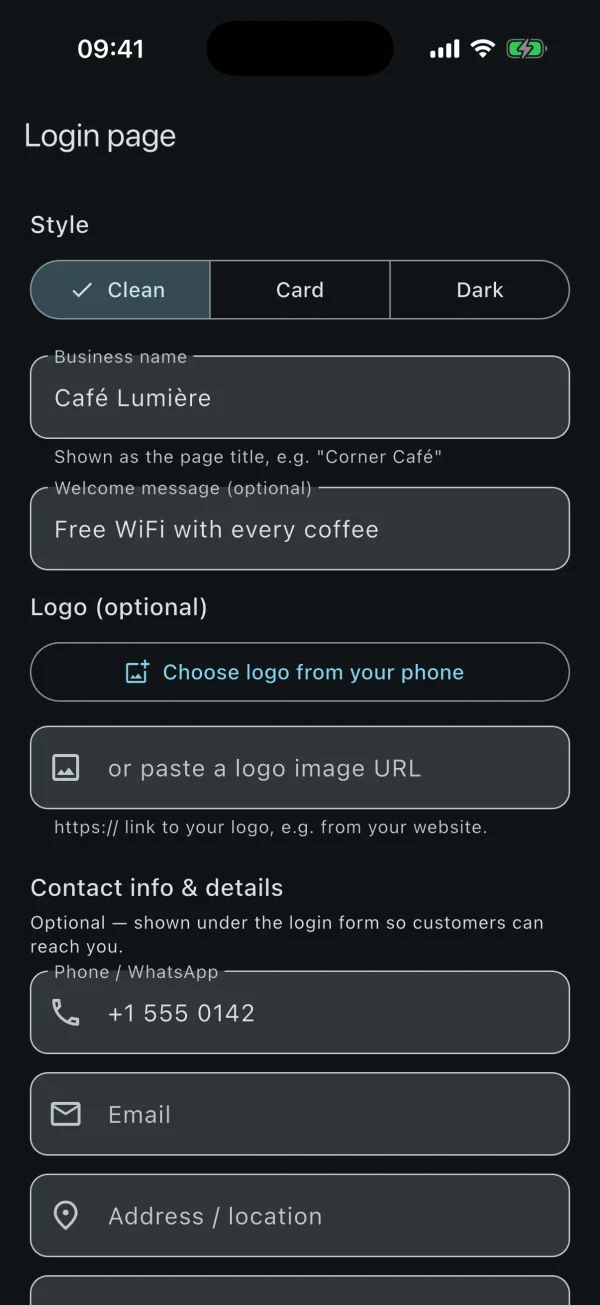
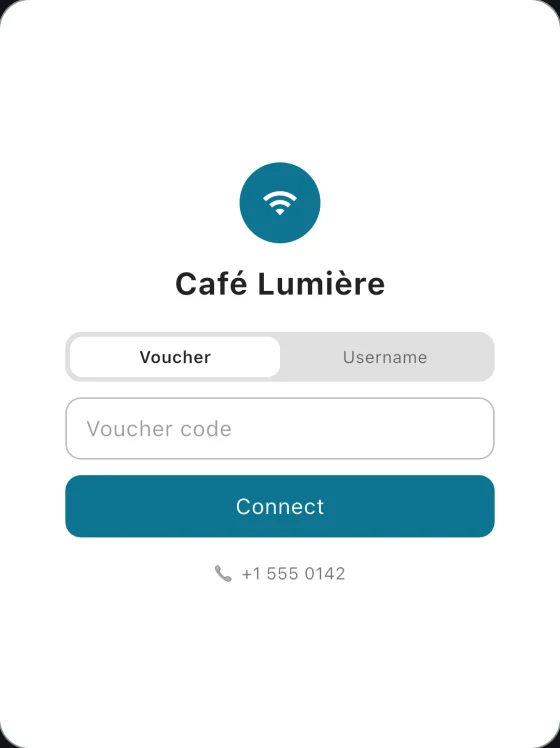
Replace MikroTik's stock hotspot page with one that carries your business name, logo, welcome message and contact details. Guests can check their own remaining time and data.

  • Three styles to start from, applied to the router in one tap
  • Several languages on one page, opening in the guest's own
  • Voucher or username sign-in, whichever you sell
Login page designer: style, business name, welcome message, logo and contact details
The guest's view: Café Lumière hotspot login page with voucher and username sign-in
Reports

Know what every voucher earned

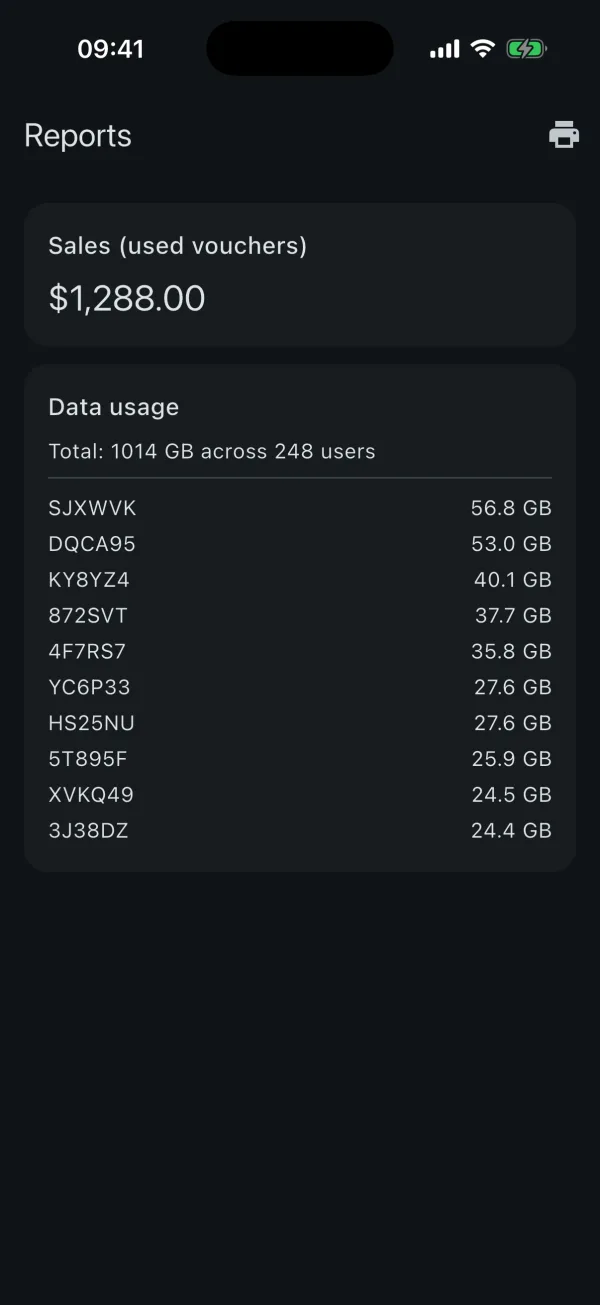
Revenue and vouchers sold, per day, per plan and per batch, plus the data each guest used. Today, the last 7 or 30 days, or all time, printed or saved as a PDF.

  • Sales dated by first login, so a voucher counts on the day it was used
  • Unused vouchers and what they're still worth
  • Router health at a glance: CPU, memory, disk and uptime
Reports: $1,288.00 in sales from used vouchers and data usage per user
Setup and checks

When guests can't get online, it tells you why

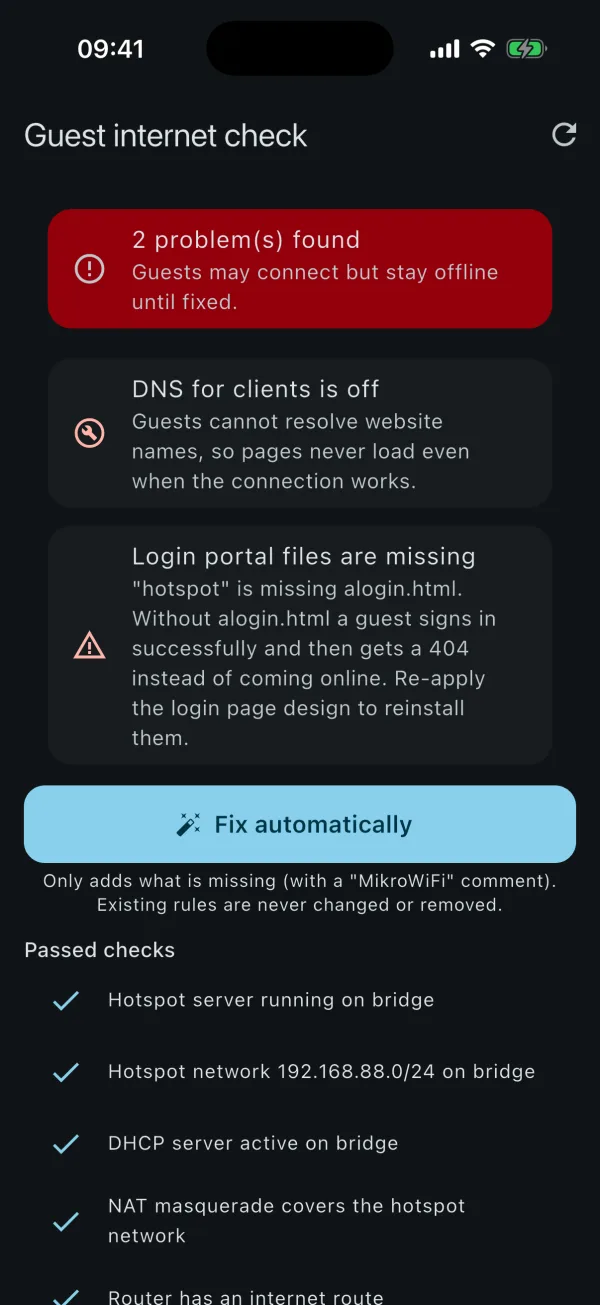
The guest internet check looks at the hotspot, DHCP, DNS, NAT and the login page files, and fixes most problems with one tap.

  • Only adds what's missing, marked "MikroWiFi". Your own rules are never changed
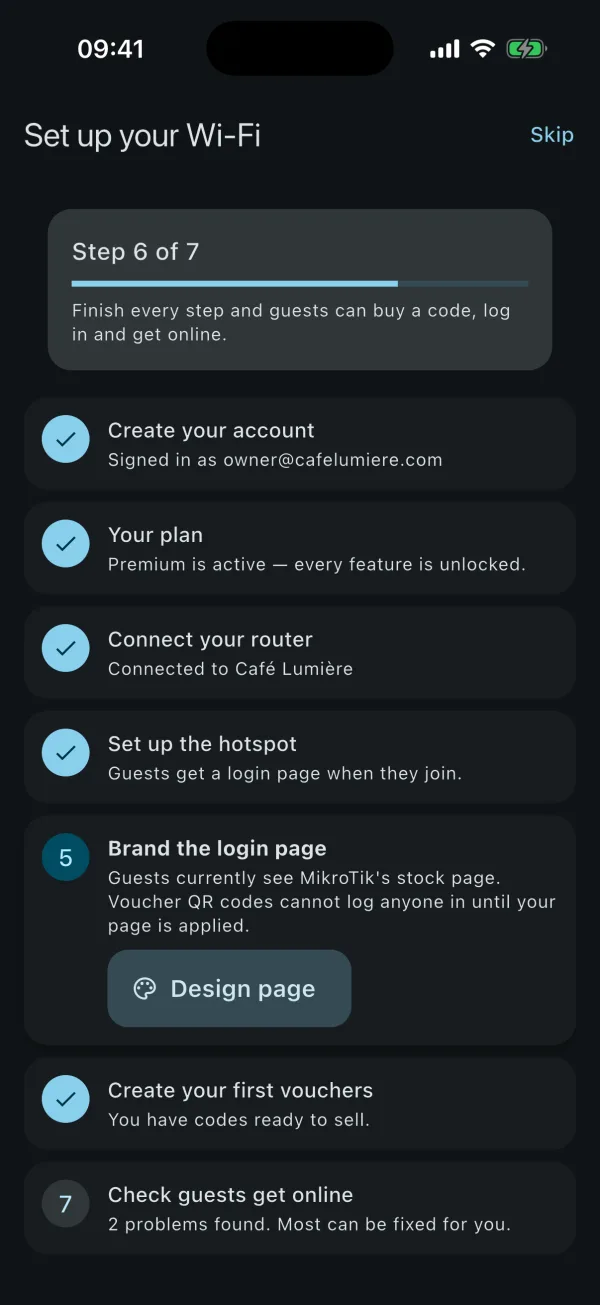
  • A setup guide that shows the next step until guests can buy a code
  • Works on RouterOS 6 and 7, old WiFi and new WiFi menus alike
Setup guide: account, plan, router, hotspot, login page, vouchers and guest check steps
Guest internet check: two problems found, with a button to fix them automatically
And more

The details that save you a trip to the router

Router security in one screen

Turn off Telnet, FTP and unencrypted admin services one switch at a time, and get secure HTTPS WebFig. The connection you're using can't be switched off, so you never lock yourself out.

Bluetooth receipt printing

Print vouchers straight to a 58 mm Bluetooth thermal printer at the counter, in any language your tickets use.

Many routers, one app

Run up to 100 sites from one account. Each router keeps its own users, vouchers and reports; switch with a tap.

Data limits that run on the router

Total, daily or fair-use allowances keep working when your phone is off, because the router enforces them itself.

Encrypted cloud backup

Back up your settings, encrypted on your phone with a passphrase only you know. We store data we can't read.

Support inside the app

Open a ticket from the app and get a notification when we reply. Real people, not a bot.

Who it's for

Built for places that sell WiFi

Cafés and restaurants

Print an hour of WiFi on the receipt, or give it away with every coffee.

Hotels and guesthouses

A code per room or per stay, with a login page that carries your name.

WISPs and small ISPs

Daily and monthly plans with data limits across many sites, from one phone.

Shops, schools and events

Short codes for visitors, owner devices that skip the login, and a clean router.

Private by design

Your router is yours. So are its passwords.

MikroWiFi talks to your router directly from your phone. Its address and password never reach our servers, and nothing that identifies your guests does either.

  • Router credentials stay in the phone's Keychain or Keystore
  • Backups are encrypted end to end with AES-256-GCM
  • No ads and no advertising trackers
  • Every change on the router is labelled "MikroWiFi" and easy to remove
  • Read the privacy policy
Pricing

Start free. Pay when it's paying you.

Every feature is free for 14 days. After that, keep the basics for free or pick the plan that fits your number of routers.

Free

For trying it on one router.

$0forever

After the 14-day trial

  • 1 router
  • Dashboard and router health
  • See your hotspot users
  • Vouchers in batches of 3

Solo

One café, shop or guesthouse.

$9$8.10$7.20/ month

Billed monthly$48.60 every 6 months$86.40 a year

  • 1 router
  • Unlimited vouchers and printing
  • Online users and user management
  • Branded login page
  • Reports, security and backup

Fleet

WISPs and ISPs with many sites.

$39$35.10$31.20/ month

Billed monthly$210.60 every 6 months$374.40 a year

  • Up to 100 routers
  • Everything in Pro
  • Built for ISP-scale fleets

Prices in US dollars; your store shows the price in your currency before you pay. Subscriptions renew automatically through Google Play or the App Store, and you can cancel any time. Staff with their own accounts get your plan on the routers it covers.

FAQ

Questions, answered

Which MikroTik routers does MikroWiFi work with?

Any MikroTik device running RouterOS 6.0 or newer, including hAP, hEX, cAP, RB and CCR models and the Cloud Hosted Router (CHR). MikroWiFi uses the REST API on RouterOS 7 and the classic API on older firmware, and picks the right one by itself.

Do I need WinBox or terminal commands?

No. Setting up the hotspot, creating vouchers, branding the login page and fixing common problems are all done from the app. You never type a RouterOS command.

How do WiFi vouchers work?

Create a batch of voucher codes with a speed, a time limit, a data limit and a price. Print them as A4 card sheets, 58 mm receipts, or straight to a Bluetooth thermal printer. Each voucher carries a QR code: once your MikroWiFi login page is on the router, guests scan it and are online without typing anything.

Can I print vouchers on a Bluetooth thermal printer?

Yes. MikroWiFi prints to 58 mm ESC/POS Bluetooth receipt printers. On Android it lists your paired printers; on iPhone and iPad it finds Bluetooth LE printers nearby. Tickets print correctly in any language, including Arabic, Persian and Chinese.

Can I limit data or slow guests down after a quota?

Yes. A plan can have a total data limit, a daily data allowance, or fair use, where guests keep browsing at a lower speed after their allowance instead of being cut off. These rules run on the router itself, so they keep working when your phone is off.

Can guests see the login page in their own language?

Yes. Pick the language of your login page and add more: guests get a language menu, and the page opens in their phone's language when it is one you offer. The app itself is available in 12 languages.

Is my router password safe?

Yes. Router addresses and passwords are kept only in your phone's secure storage (Android Keystore or iOS Keychain) and are never uploaded. Optional cloud backups are encrypted on your phone with a passphrase only you know.

Can I manage several routers or locations?

Yes. Pro covers up to 10 routers and Fleet up to 100. Each router keeps its own users, vouchers and reports, and you switch between them with one tap.

Can my staff use the app on my routers?

Yes. Each person signs in with their own account. On a router your plan covers, their account gets your plan's features at no extra cost.

What happens when the free trial ends?

Every feature is free for 14 days, once per router. After that the free tier stays: one router, the dashboard, your hotspot users, and vouchers in batches of three. Your hotspot keeps running and vouchers you already sold keep working. Choose a plan whenever you need more.

How do I cancel a subscription?

In your Google Play or App Store subscriptions, at any time. Deleting the app does not cancel a subscription.

Is MikroWiFi made by MikroTik?

No. MikroWiFi is an independent app for MikroTik routers and is not affiliated with MikroTik SIA. MikroTik and RouterOS are trademarks of MikroTik SIA.

Something else? Write to support@mikrowifi.com. To close your account, see account deletion.

Sell your first voucher today

Download MikroWiFi, connect your MikroTik and try every feature free for 14 days.